IT Supplier Risk: Check Before You Connect
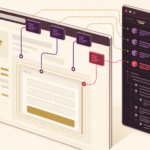
Every new business tool creates a new connection to your company. This advisory explains what Australian SMEs should check before connecting new cloud apps, CRM add-ons, plugins, payment gateways or automation tools.
Key takeaways
- Check what data a new tool can read, store or change.
- Confirm user access, administrator rights and MFA before connecting it.
- Clarify supplier support, incident and outage responsibilities.
- Keep exit controls ready so access can be removed quickly when staff, contractors or suppliers change.
Video transcript
Every new business tool creates a new connection to your company.
A CRM add-on, website plugin, payment gateway, booking system or automation tool can save time, but it can also touch customer records, invoices, emails, files and staff accounts.
Before you connect a new supplier, ask what data the tool can access, who has administrator rights, whether multi-factor authentication is available, what happens if the supplier has an outage or security issue, and how quickly access can be removed.
For higher-risk tools, use role-based permissions, keep administrator accounts limited, document supplier responsibilities and review integrations regularly.
Technology should help your business move faster, but every connected tool should also be trusted, controlled and recoverable.
Supporting article and services
Read the supporting article on IT supplier risk checks
← Back to all video logs