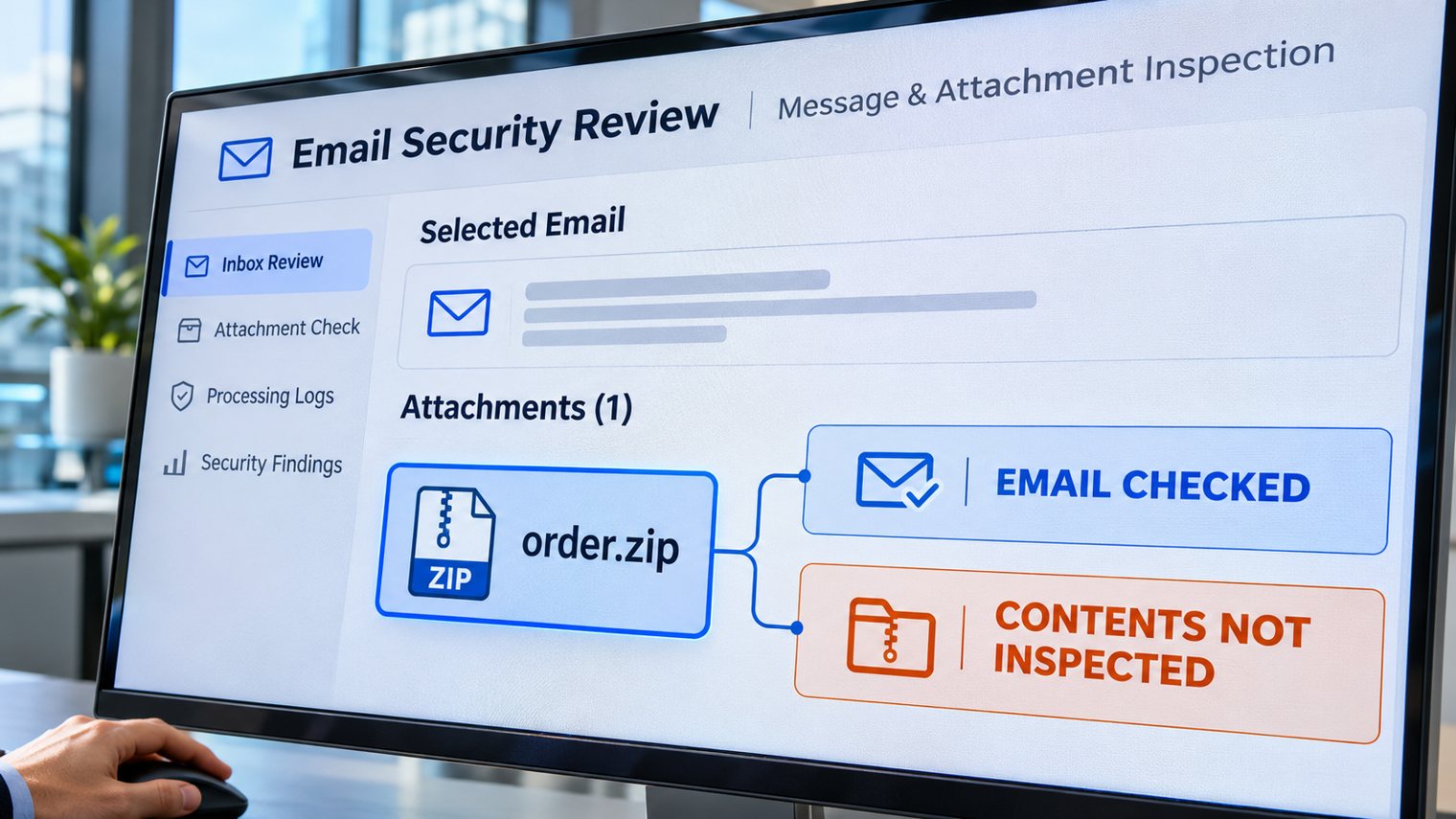
A supplier emails an order pack as a password-protected ZIP. The message reaches your inbox, the password arrives separately, and the deadline is approaching. Does that mean the files inside were checked?
Not necessarily. Encrypted email attachments can protect confidential information while also limiting what a security service can inspect. In this hypothetical example, the important question is not whether the email arrived. It is whether the actual files were examined before anyone opened them.
Encryption protects contents, not their intentions
A ZIP archive packages files together. When its contents are encrypted, a scanner generally needs a usable password to decrypt and examine them. The email body, sender information and outer attachment may still be processed while the protected contents remain uninspected.
That distinction matters when a dashboard says a message was checked or delivered. Neither statement, by itself, proves the security engine could inspect every file inside. A file that could not be examined is not the same as a file confirmed safe.
Password-protected archives are not automatically malicious. Businesses use them for legitimate transfers. But a password is an access control, not a malware-safety certificate. If harmful content is hidden inside, opening it could expose credentials, customer information or business systems.
What happens to encrypted email attachments?
The answer depends on your service, licence, configuration and the file involved. Avoid assuming that every encrypted attachment bypasses every scanner.
Microsoft’s Safe Attachments documentation explains that password-protected contents cannot be fully scanned or analysed in its virtual environment unless a password is available, for example through extraction from the email body. It also describes configurable quarantine and password-assisted release options, with limitations. That does not establish what your organisation has enabled.
Sending a password through another channel may help protect the transfer, but does not demonstrate that the inspection service obtained it. Conversely, putting a password in an email is not proof that scanning succeeded. Ask your provider for the actual processing result.
Decide the exception before the deadline
For a business owner, the trade-off is between handling legitimate documents promptly and allowing unverified content onto working devices. Leaving that decision to whichever employee is waiting for a delivery creates an unreliable security control.
- Set a default. Agree whether attachments that cannot be inspected are blocked or quarantined, and identify who can authorise an exception.
- Provide a workable alternative. Offer an approved transfer and inspection process appropriate to the information’s sensitivity. Do not ask staff to remove protection or use personal email to get around a block.
- Require evidence for release. Confirm the sender and business purpose independently, establish what was inspected, and record the authorised decision. Familiar branding or a correct password is insufficient.
- Keep responsibility with the right team. Your IT provider handles controlled inspection and policy changes; the business owner decides acceptable exposure and urgency.
Test visibility, not just delivery
Ask your provider to demonstrate the workflow using harmless test documents, both ordinary and password-protected, in an authorised test. Check whether logs distinguish inspected contents from an unavailable password, unsupported format or scanning limit. Verify which recipients and exceptions the policy actually covers.
A successful harmless-file test demonstrates processing and policy behaviour, not that every future malicious file will be detected. Repeat the checks after material service or policy changes. Do not upload confidential supplier or customer documents to public scanning websites without appropriate authorisation.
ASD’s email guidance supports layered filtering. Its detailed malicious-email guidance recommends holding protected content until it can be deemed safe. These are security-engineering references, not a claim that every ISM control is a legal requirement for every Australian small business.
How Xpansion can support your next step
Xpansion Technologies can help review managed IT and security requirements, map attachment-handling responsibilities and plan practical verification with your provider. The useful question is simple: What evidence shows that the contents, not just the message, were checked?
Sources
- ASD Information Security Manual: Guidelines for email, September 2026 edition
- ASD: Malicious email mitigation strategies, October 2021 guidance referenced by the ISM
- Microsoft: Safe Attachments, including encrypted attachment handling and policy limitations
Source scope: Microsoft is the product vendor, not a regulator. Feature descriptions do not verify a customer’s licensing or configuration. This is an educational article using a hypothetical example, not a report of a new incident.